
For modern enterprises, launching a WordPress website is often the first step toward building an online presence. However, if your website lacks speed, you are silently losing valuable leads, conversions, and search visibility.
Modern internet users demand instant results. A slow website creates immediate friction, driving potential clients directly to your competitors. Research consistently demonstrates that a significant portion of mobile visitors will abandon a page if it takes more than a few seconds to load. This abandonment drives bounce rates up, pulls conversion rates down, and severely damages user experience (UX).
Furthermore, search engines prioritize speed and user experience as critical ranking metrics. Google PageSpeed Insights, powered by the open-source Lighthouse engine, evaluates your site based on real-world rendering behavior, visual stability, and interaction speeds.
As search behavior shifts toward conversational platforms, optimizing your digital infrastructure is essential. Investing in premium web design in dubai ensures your website is built from the ground up to load fast, rank high, and serve as a trusted resource for search systems.
What Does a 100/100 Score on Google PageSpeed Insights Actually Mean?
Achieving a perfect 100/100 score on Google PageSpeed Insights is a prestigious milestone for any technical team. It indicates that under Google’s standardized laboratory testing conditions, your website’s front-end architecture is exceptionally clean and well-optimized.
Specifically, a perfect score means your site:
-
Loads almost instantly across simulated devices.
-
Responds immediately to user interactions without script-blocking delays.
-
Maintains perfect visual stability during the rendering process.
-
Adheres to modern web development standards and clean code compilation.
However, a 100/100 score in a laboratory environment does not guarantee the site will load at the exact same speed for every user in the real world. Real-world speeds vary depending on local network conditions, server latency, and the processing power of the user’s device.
In the WordPress ecosystem, achieving high performance requires more than just installing a basic caching plugin. True optimization demands a holistic, developer-led approach that includes:
-
Standardized, lightweight coding practices.
-
Bespoke, clean asset delivery (images, CSS, JS).
-
High-performance enterprise hosting.
-
Intelligent script and database management.
Demystifying Core Web Vitals: The Metrics That Matter
Core Web Vitals are Google’s standardized metrics used to measure the real-world user experience of a webpage. Rather than focusing on abstract server metrics, these indicators analyze exactly how a human experiences your site.
To secure prominent visibility on search engine results pages and AI summaries, your website must meet specific performance thresholds across three primary pillars.
1. Largest Contentful Paint (LCP) – Loading Performance
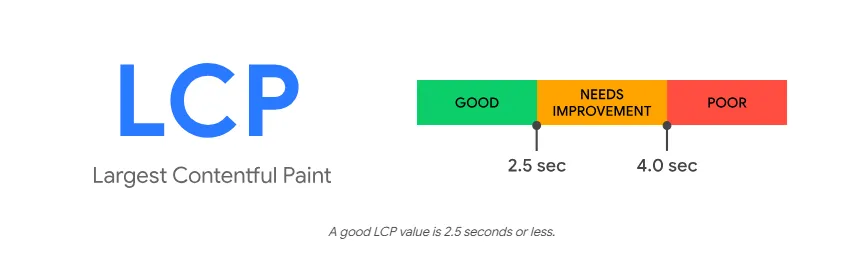
LCP measures how long it takes for the primary content of a page to render on the screen. This typically includes:
-
The main hero banner image.
-
The primary H1 heading.
-
The dominant block of introductory text.
To provide a good user experience, Google requires an LCP of 2.5 seconds or less. When LCP is slow, users perceive your site as unresponsive, leading to high bounce rates.
Common causes of slow LCP in WordPress include unoptimized media assets, slow server response times (TTFB), render-blocking CSS/JS, and bloated themes.
2. Interaction to Next Paint (INP) – Responsiveness
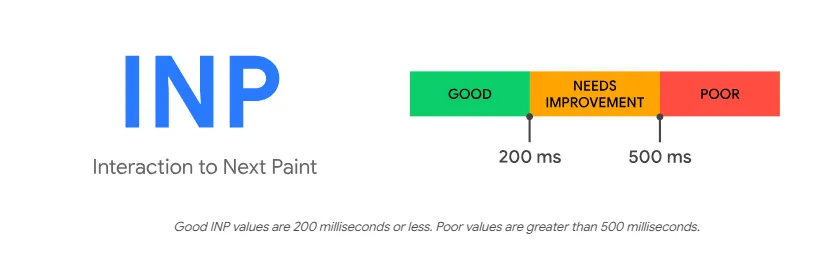
INP measures your website’s responsiveness to user input, such as:
-
Clicking a primary call-to-action (CTA) button.
-
Submitting an online contact form.
-
Opening a mobile navigation menu.
-
Using an internal site search bar.
A good user experience is defined by an INP of 200 milliseconds or less. If a user clicks an element and experiences a perceptible delay before the browser renders the next frame, it creates a frustrating user experience.
High INP is typically caused by heavy JavaScript execution, complex third-party tracking codes, and unoptimized layout scripts.
3. Cumulative Layout Shift (CLS) – Visual Stability
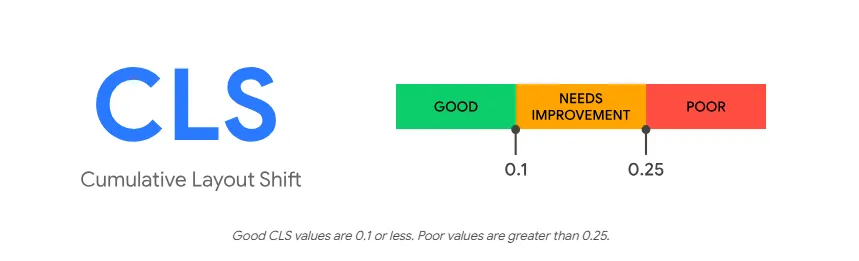
Have you ever tried to click a link on a mobile device, only for the page content to suddenly shift, causing you to click the wrong element? This frustrating experience is exactly what CLS measures.
Google expects a CLS score of 0.1 or less. Visual shifts occur when resources load asynchronously or when DOM elements are dynamically added to the page without pre-defined dimensions.
In WordPress, CLS is usually caused by images without explicit height and width attributes, dynamic ad placements, late-loading web fonts, or visual elements injected by heavy page builders.
A Step-by-Step Framework to Optimize WordPress Speed
This systematic framework is used by elite digital teams to optimize WordPress platforms, whether you manage a corporate website, an e-commerce platform, or a high-traffic media portal.
[High-Performance Server] ➔ [Lightweight Theme] ➔ [Optimized Images] ➔ [Edge Caching / CDN] ➔ [Minimized Scripts]
Step 1: Secure Enterprise-Grade Hosting
Your hosting server is the foundation of your website’s speed. Even a perfectly optimized codebase will perform poorly on a congested, low-cost shared hosting server.
For commercial enterprises, utilizing a managed WordPress host, a dedicated virtual private server (VPS), or a highly scalable cloud infrastructure is essential. A robust server setup should feature:
-
LiteSpeed or NGINX web servers.
-
The latest PHP version for optimal execution speeds.
-
HTTP/3 and QUIC protocol support for faster browser connections.
-
Ultra-fast NVMe SSD storage.
-
Server-level object caching (Redis or Memcached).
Step 2: Deploy a Lightweight, Optimized Theme
Your WordPress theme dictates how your site’s code is structured. Many multipurpose commercial themes come pre-packaged with unnecessary style sheets, complex layout builders, and redundant visual scripts that degrade performance.
An optimized theme should maintain a clean HTML5 hierarchy, minimize dependencies on external libraries, integrate seamlessly with the native WordPress block editor, and compile clean inline CSS.
Step 3: Implement Professional Image Optimization
High-resolution images are often the single largest cause of page bloat. Optimizing your visual assets can instantly improve your PageSpeed score.
-
Modern Formats: Convert all standard PNG and JPEG files into next-generation formats like WebP or AVIF.
-
Explicit Dimensions: Define explicit width and height attributes in your HTML to prevent layout shifts (CLS).
-
Lazy Loading: Enable native lazy loading so images below the fold only load as the user scrolls down.
-
Prioritize Above-the-Fold Media: Ensure your primary hero banner is loaded immediately without lazy loading to protect your LCP score.
Step 4: Configure Advanced Caching Mechanics
Caching reduces the processing load on your server by delivering pre-rendered HTML files to visitors, bypassing database queries. A comprehensive caching policy must include page caching, browser caching, Brotli compression, and server-side database object caching with Redis.
Avoid running multiple caching plugins simultaneously, as overlapping configurations can cause script conflicts and break your site’s layout.
Step 5: Minify and Defer Render-Blocking JavaScript and CSS
Browsers parse code sequentially. When they encounter heavy scripts, they pause visual rendering until the scripts are fully downloaded and executed.
-
Minify Source Code: Strip out comments, spaces, and formatting from your CSS and JS files.
-
Defer Non-Essential Scripts: Defer or asynchronously load non-critical JavaScript (such as analytics or chat widgets) so they execute only after the primary page content has rendered.
-
Inline Critical CSS: Deliver the styling required to render above-the-fold content inline, allowing the initial view of your page to load instantly.
Step 6: Streamline Web Font Delivery
Custom fonts can delay text rendering, leaving users looking at blank spaces during the initial load. To prevent this, host your web fonts locally on your server rather than pulling them from external networks.
Use the font-display: swap property in your CSS to instruct the browser to display a system font immediately while downloading your custom font in the background.
Step 7: Cleanse the WordPress Database
As a website ages, its database accumulates unnecessary tables, post revisions, spam comments, transient data, and leftover settings from uninstalled plugins.
Conducting regular database maintenance keeps your system clean. To further optimize backend performance, replace the default virtual WP-Cron system with a real server-level Cron job, reducing administrative overhead during user visits.
Step 8: Leverage a Global Content Delivery Network (CDN)
In today’s global digital economy, a CDN is a vital performance asset. A CDN hosts cached copies of your site’s static assets (images, stylesheets, scripts) across a global network of edge servers.
When a user visits your site, the CDN serves these files from the server physically closest to them. This drastically reduces round-trip times (TTFB), decreases bandwidth consumption on your main server, and ensures consistent, rapid load times for visitors around the world.
Why Mobile Optimization Must Be Your Primary Focus
When testing your site, you will often notice that mobile PageSpeed scores are lower than desktop scores. This is completely normal and expected.
Desktop Testing Environment: High-speed fiber connection + Powerful CPU processing
Mobile Testing Environment: Mid-tier mobile processor + Slower 4G/5G connection simulation
Google evaluates mobile performance using stricter criteria, simulating mid-tier devices and slower mobile connections. Because Google uses Mobile-First Indexing, your mobile performance is the primary factor dictating your search rankings. A perfect desktop score cannot compensate for a sluggish mobile experience.
Mobile Optimization Checklist
To ensure your WordPress site excels on mobile devices, keep your total page weight under 1.5 MB to 2.0 MB.
Be sure to limit mobile-specific plugins, use responsive images that dynamically adapt to smaller screen widths, defer non-critical JavaScript, avoid intrusive mobile pop-ups that block the screen, and ensure your headers are lightweight to prevent Cumulative Layout Shift.
Professional Diagnostic Tools Used by Speed Experts
Optimizing a website requires precise technical diagnostics. Industry professionals rely on a specialized suite of tools to identify performance bottlenecks:
-
Google PageSpeed Insights: The definitive platform for tracking Core Web Vitals and evaluating field data.
-
Chrome DevTools: An indispensable browser interface for inspecting CSS rendering, tracking network requests, and identifying script-blocking errors.
-
WebPageTest: A highly advanced auditing tool that lets you test loading speeds from multiple global test locations and on actual physical devices.
-
Search Console Core Web Vitals Report: Tracks actual user experience data (Field Data) across your entire site, pointing out real-world LCP, INP, and CLS issues.
The Strategic Impact of Speed on Modern Search and Conversions
Optimizing your website’s speed is a highly effective way to grow your business and improve your search rankings.
1. Organic Search Rankings
Google rewards websites that load quickly and offer a great user experience. A fast site keeps visitors engaged longer, sends positive user-behavior signals back to search algorithms, and helps secure premium placements.
2. Maximum Conversions and Revenue
Speed is directly tied to your bottom line. If an e-commerce page or lead capture form loads slowly, users will leave before converting. Every fraction of a second saved on your checkout or signup pages leads to a direct increase in conversions.
3. Visibility in AI Search and Google AI Overviews
Modern conversational AI engines prioritize speed, clean code, and well-structured markup when selecting sources. Fast-loading websites with structured layouts are much easier for AI crawlers to parse, making them highly eligible to be featured as primary references in generative search answers.
Summary: Is a Perfect 100/100 Score Your Ultimate Goal?
While reaching a 100/100 score on Google PageSpeed Insights is an excellent target, it should not be chased at the expense of your actual business goals. Your real objective is to build a fast, secure, and user-friendly website that performs flawlessly for real visitors.
Website optimization is an ongoing process. As your business grows and you add new content or features, your speed performance will naturally shift.
Partnering with technical specialists ensures your website is built on a scalable, high-performance architecture from day one. By choosing professional web development and experienced consultants, you can rest assured your platform is fully optimized for speed, search visibility, and next-generation search engines.
Frequently Asked Questions
Is a perfect 100/100 PageSpeed score required to rank on Google?
No, a perfect 100/100 score is not a ranking requirement. Google’s primary focus is on actual user experience and passing the Core Web Vitals thresholds. A fast website with high-quality, authoritative content can rank exceptionally well even if its technical score is slightly below 100.
How long does a full WordPress speed optimization project take?
Basic optimizations, such as setting up image compression and caching, can be completed in a few days. However, a comprehensive overhaul of your hosting, custom theme code, third-party script management, and Core Web Vitals typically requires a few weeks of dedicated technical engineering.
Does site speed affect whether my content is displayed in Google AI Overviews?
Yes, site speed plays a key role in AI search visibility. Generative search crawlers must parse web pages quickly to synthesize answers in real time. Fast, well-structured, and technically sound websites are much more likely to be selected as primary citations.